
Binance 2FA: How to Set Up an Authenticator App
Your Binance account gives access to your crypto balances and trading, so it deserves more than a password. Binance works with codes from an authenticator app, which means Authenticator App - Novaz can supply the second step each time you sign in.
Crypto transactions can't be reversed, so protecting your Binance sign-in with 2FA is essential. Besides an authenticator app, Binance also offers security keys and SMS text codes. An authenticator app (TOTP) is usually the best balance of security and convenience — and it's safer than SMS codes, which can be intercepted through SIM-swap attacks. For the strongest protection, Binance also supports hardware security keys.
2FA methods Binance supports
- Authenticator app (TOTP)
- Security key (U2F / WebAuthn)
- SMS text message
Before you start
- Your Binance login details
- Access to the email inbox linked to your Binance account, since Binance sends a verification code there
- Authenticator App - Novaz installed on your iPhone or iPad
- Binance open on a computer, so the QR code is on a separate screen from your phone
Part 1: Turn on 2FA in Binance
- 1
Open Account, then Security
After signing in to Binance on the website, hover over the profile icon at the top right, click "Account", then open "Security".
- 2
Click Manage next to Authenticator App
In the Security page, find "Authenticator App" and click "Manage" beside it.
- 3
Click Enable Authenticator App
Click "Enable Authenticator App". Binance works with any authenticator app, Authenticator App - Novaz included.
- 4
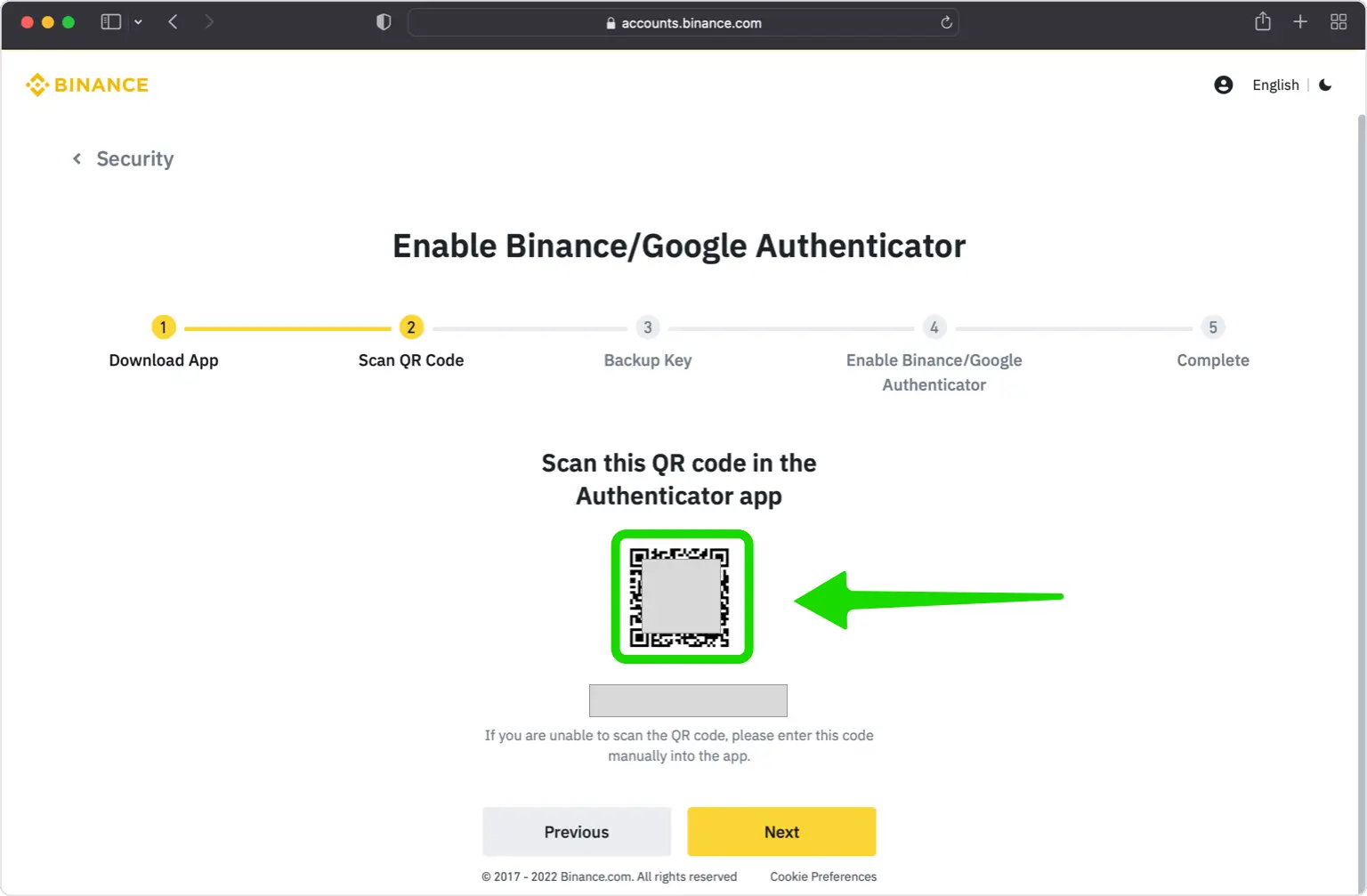
Keep the QR code visible
Binance now shows a QR code and a setup key for your account. Leave this window up while you grab your iPhone, and don't click "Next" until the account is saved in the app.
Part 2: Add Binance to Authenticator App - Novaz
- 5
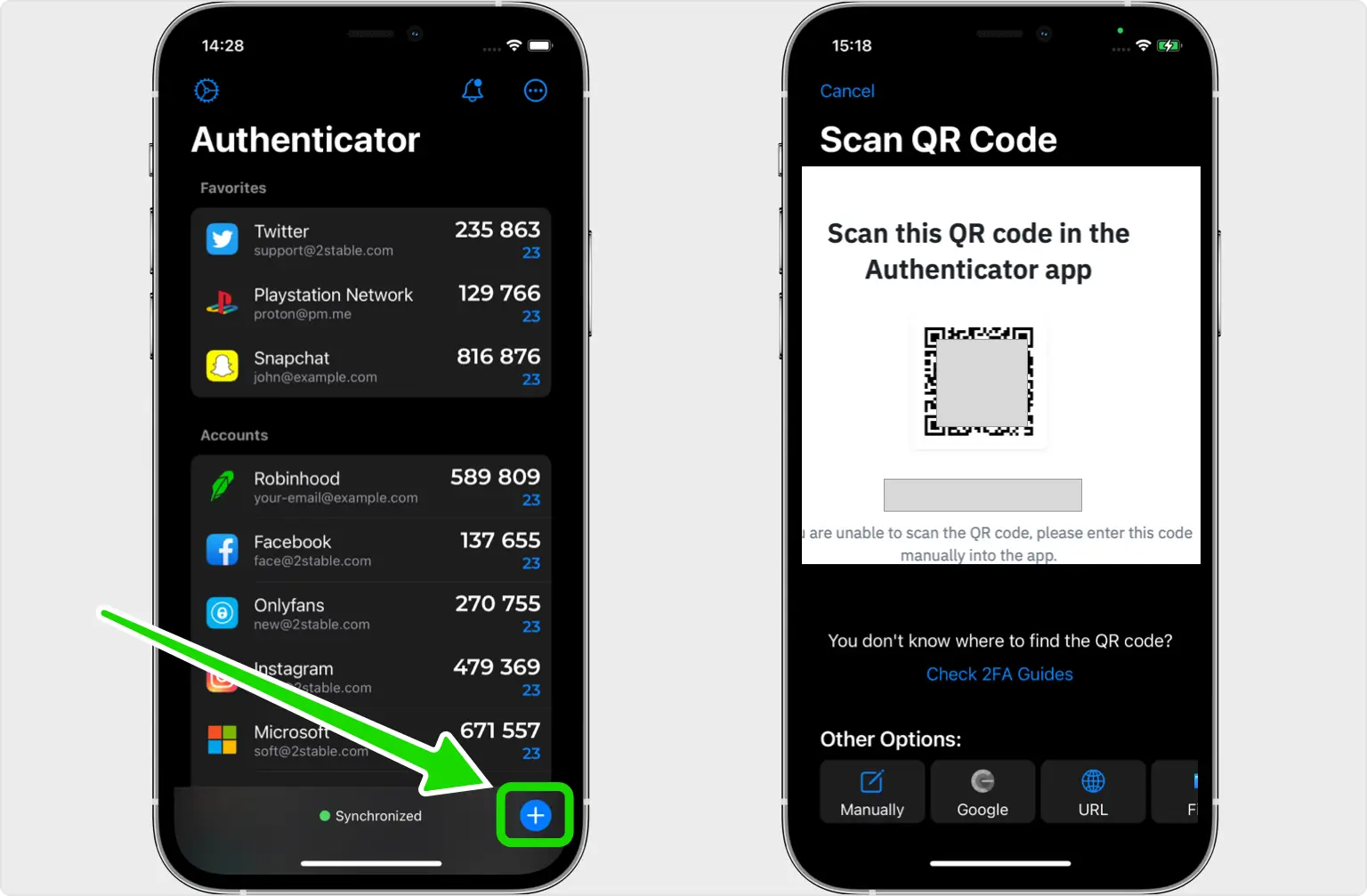
Scan the code in Authenticator App - Novaz
Launch Authenticator App - Novaz, tap the + button at the bottom and aim your camera at the QR code on your computer. If the camera can't read it, tap + again, choose "Files" and follow the prompts to import the QR code instead.
- 6
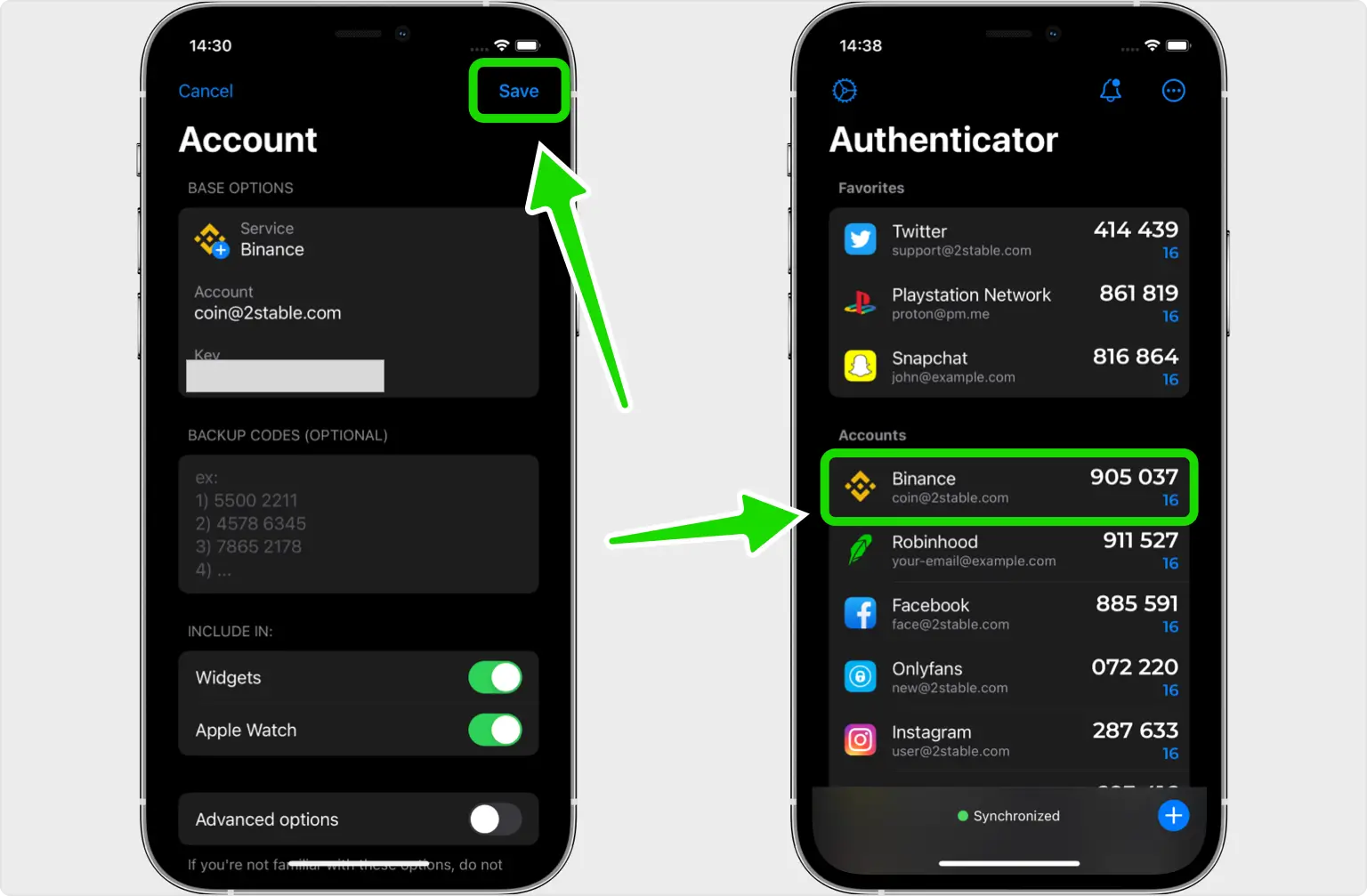
Save the account and copy the code
When the scan works, the app adds the Binance logo, account name and secret key on its own. Tap "Save", then copy the code it shows.
Part 3: Confirm and finish
- 7
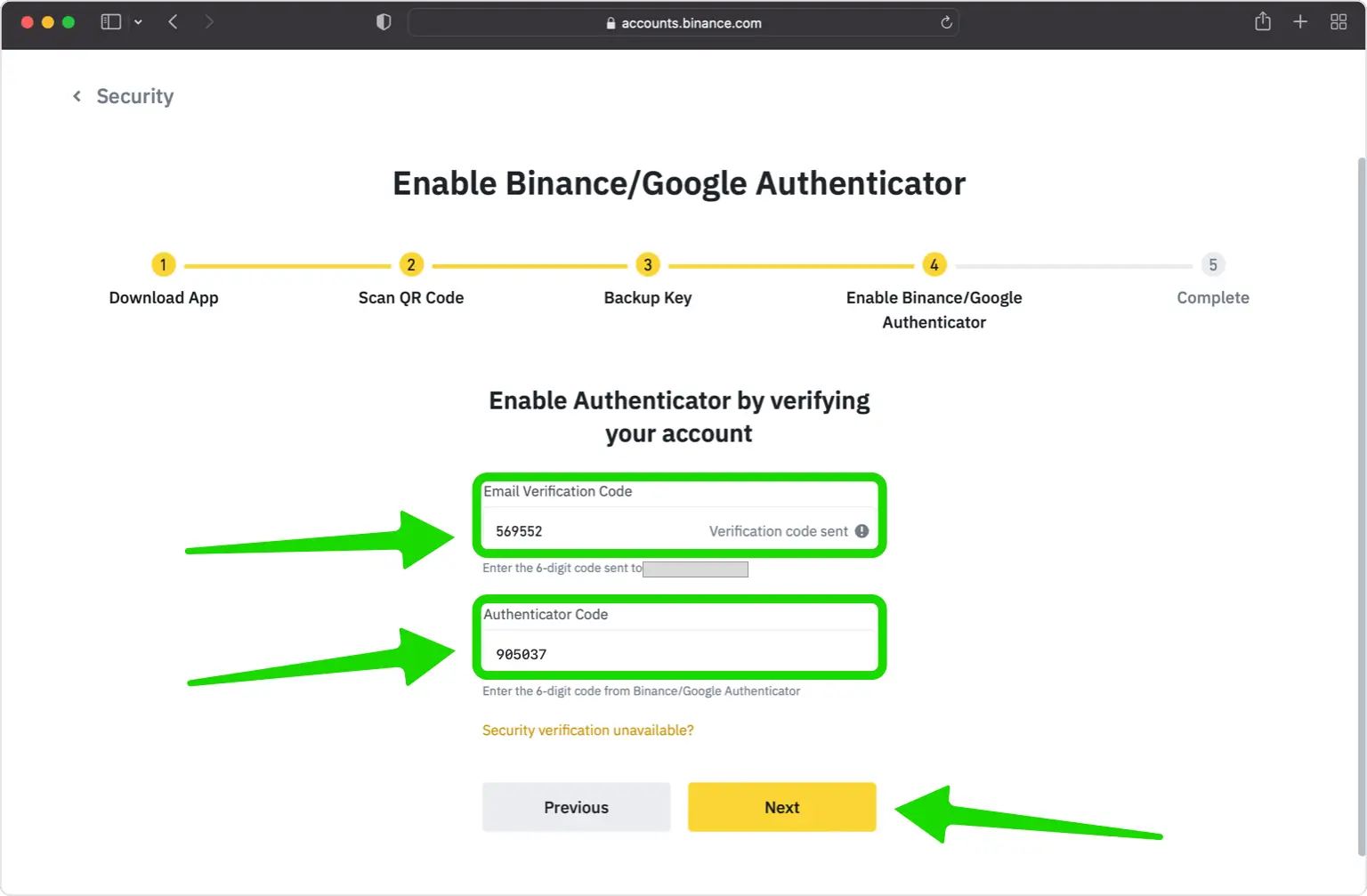
Click Next and enter the 6-digit code
Back on Binance, click "Next" and type the 6-digit code from Authenticator App - Novaz. If Binance also asks for a code it sends to your email, enter that one too.
- 8
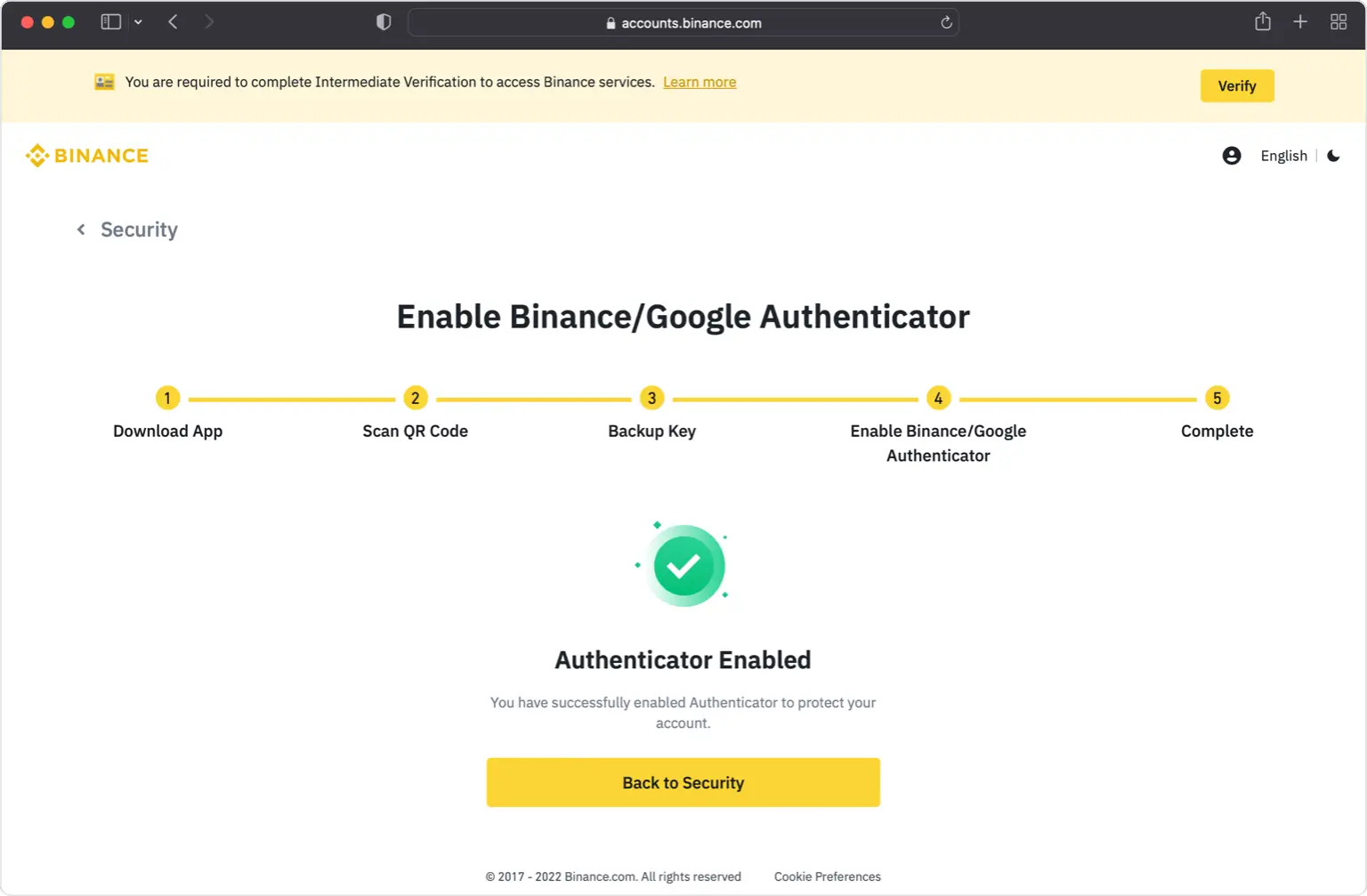
Confirm that 2FA is active
That's it: Binance now asks for your password plus a code from Authenticator App - Novaz whenever you log in.
- 9
Save a way to recover your account
If Binance offers backup or recovery codes, download them or write them down and store them somewhere safe. They are how you get back into your account if you ever lose your phone. If it doesn't, check how Binance recovers accounts before you need it.
If something goes wrong
- Binance rejects the authenticator code: check that your iPhone's date and time are set automatically (Settings > General > Date & Time), then use a fresh code.
- The code ran out while you were typing: wait a few seconds for the next one to appear and enter that instead.
- The email code hasn't arrived: look in your spam or promotions folder and make sure you're checking the inbox linked to your Binance account.
- The QR code won't scan: zoom in on the Binance page, or use the "Files" import option in Authenticator App - Novaz.
Menu names on Binance can change — the official Binance 2FA documentation ↗ always has the exact, current path.
How to recover your Binance account
If you lose access to your authenticator and Binance gave you backup or recovery codes when you turned on 2FA, sign in with one of them; keep them somewhere safe, away from your phone. Not every service issues codes. If Binance doesn't, or you didn't save them, use Binance's account-recovery or support process (or ask your admin, for a work account) to get back in.
Frequently asked questions
- Does Binance work with authenticator apps like Authenticator App - Novaz?
- Yes. Binance supports TOTP authenticator apps, so you can generate its two-factor codes in Authenticator App - Novaz.
- Is Binance two-factor authentication free?
- Yes. Enabling authenticator-app 2FA on Binance is free — you only need the free Authenticator App - Novaz.
- What if I lose access to my Binance 2FA codes?
- If Binance gave you backup or recovery codes during setup, sign in with one of them. If it didn't, or you didn't save them, use Binance's account recovery or contact its support (or your admin, for a work account), then add the account to Authenticator App - Novaz again.
- Should I use an authenticator app or a security key on Binance?
- Binance supports both. An authenticator app like Authenticator App - Novaz is free and works on any phone; a hardware security key adds phishing resistance. You can enable both.
Generate your Binance codes in Authenticator App - Novaz
Free, offline, and encrypted. One tap for every 6-digit code.
Get the appMore Crypto guides



Novaz is not affiliated with, endorsed by, or sponsored by Binance. Binance and its logo are trademarks of their respective owner and are used here for identification only.